I’m currently unable to get MagicPreview to work on one of our sites. The preview button is available when editing a resource and opens a preview tab, but none of the edits I’ve made to the resource actually show up in the preview. I’m not seeing any error messages in the log either.
The site is using MODX Revolution 3.1.2-pl as well as the ContentBlocks and MoreGallery extras from modmore, plus a couple other extras such as Babel. I did see that Lingua is not compatible, could it be that the same is the case for Babel?
Hi @bellevue7k , just to check, are you on the latest version of Magic Preview?
There were some issues showing changes to extra fields such as TVs in older versions, but the latest one should be working fine.
Does anything show up in your browser console? When clicking the preview button? (in the tab with the manager, not the preview tab)
Hi @digitalpenguin , I’m on version 1.5.1-pl.
I’m not seeing anything noteworthy showing up in the browser console of the manager tab or the preview tab.
Hmmm there’s not much to go on if there are no errors showing in any responses in the browser console.
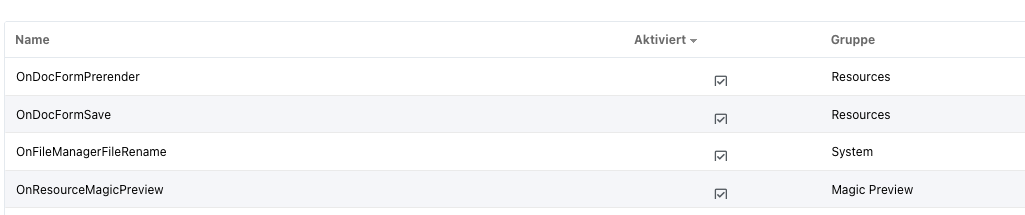
The next step for troubleshooting would be try deactivating all MODX plugins (besides MagicPreview) and see if it works. If so, reactivate each plugin until you find the conflict.
To deactivate plugins it’s probably easiest to open the plugin section in the element, right-click on a plugin, then click deactivate.
So I tried deactivating all plugins except MagicPreview, but the preview is still not working. I also uninstalled and reinstalled the extra, just in case, but that made no difference either.
Could this possibly be an issue related to permissions? I noticed recently that I am also unable to view unpublished pages, even when logged in as administrator, which has view_unpublished set to true.
Hi @bellevue7k , yeah it’s very possible permissions could be interfering with it.
MagicPreview needs the user to have manager access to see a preview, but other permission policies blocking a user could still come into play.
I think I found the issue: I had the context setting session_enabled set to false, after changing it to true I am now able to preview my changes as expected!
Actually, it’s still not quite working as expected.
As mentioned above, the website uses Babel and has 4 contexts set up, one for each language. In the context settings, base_url is set to /de/ and site_url is https://example.com/de/, like this:
The preview works fine for resources in the french/english/italian contexts, but for the german (web) context, it only works for the start page (set in site_start of the context settings). If I change base_url and site_url for this context to just use / instead of /de/, then the issue is fixed. However, I’d rather not change the URLs for SEO reasons.